
The Custom CSS feature is available on the Growing Organization subscription. If you're on a different plan, contact our team to learn more about upgrading.
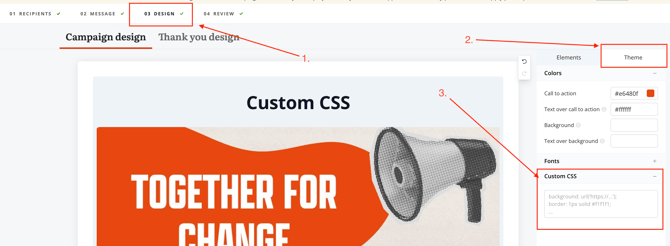
If you would like to add custom CSS to your campaign, navigate to the Design page of your form’s configuration. From there, select the Theme tab in the taskbar on the right-hand side.
Below, you’ll find a table of helpful classes and selectors that can be used to modify your campaign styling. The table includes two columns:
-
Class/Selector: The CSS class or selector you can use on the Design page of your campaign.
- Element/Section: A description of where the changes will be applied when using the corresponding class or selector.
|
Class/selector |
Element/section |
|---|---|
|
General wrapper classes |
|
|
.nm-campaign { … } |
The wrapper class for the full campaign page |
|
.two-column-layout { … } |
The responsive wrapper for the default two-column layout |
|
.content-column { … } |
The wrapper class for the content section |
|
.form-column { … } |
The wrapper class for the form details section |
|
Form field general classes |
|
|
.vf-input-group { … } |
The wrapper class for the input, label, help text, and validation per field |
|
.vf-input-field { … } |
The general form input class |
|
.vf-label, .vf-floating-label { … } |
The label and floating label classes |
|
.vf-help-text { … } |
The help text (field description, opt-in description) class |
|
.vf-element-error { … } |
The class that contains validation errors on your campaign. |
|
.vf-btn-primary { … } |
The primary button class |
|
Specific content classes |
|
|
.nm-image { … } |
The default banner image class |
|
.description-text { … } |
The main text content wrapper class |
|
.goal-meter { … } |
The goal meter wrapper class |
|
.nm-addressfield, .card--return-user { … } |
The wrapper class for the address fields and the return user address card |
|
.nm-targets { … } |
The wrapper class for displaying campaign targets |
|
.vf-btn.vf-btn-primary { |
Text on submit button (in the example provided, this will set the text colour to black) |
|
Other selectors |
|
|
.nm-campaign span, .nm-campaign p {…} |
Selects all text on a campaign |
|
.modal p, .modal span {…} |
All text on conditional messaging 'View message' modal |
|
div[optintype] span, div[optintype] label, div[optintype] p { … } |
Text associated with the opt-in element being used on your campaign. |
|
.nm-targets p {…} |
Lookup text: "Searching for your representatives“, “We couldn't find a representative in your location.", “Representatives or decision makers you will contact.“ |
|
div.suggestions-wrapper {…} |
Prefill options of dropdown menu on address field. |
While styling your campaign, if you happen to come across an element or section that you'd like to reference that can't be found on the the provided table, please let us know by contacting our support team where we'll be able to provide further assistance.